Simple Tab Saver
A Visual Studio 2022/2026 extension with a compact toolbar UI that saves and restores opened document tabs. The core idea is that a tab arrangement is part of the work, so it deserves to be saved like work: as explicit, portable, human-readable JSON next to the solution, instead of binary state inside the IDE.
Simple Tab Saver on the Visual Studio Marketplace
Documentation: Getting Started · Release Notes (current version: 1.7.0)
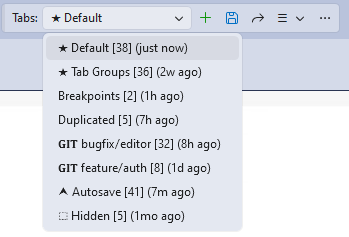
| Area | Description |
|---|---|
| Save/restore | Named tab layouts, multiple per solution, with tab order, pinned state, active tab, cursor and scroll positions. |
| Full fidelity | Tab groups, floating document windows with monitor-aware geometry, duplicated tabs, split views, tool tabs docked in the document well. |
| Drift detection | Relocation and rename detection for files tracked by a saved tab layout, so the saved tabs are never silently dropped. |
| Git integration | Branch-aware tab layouts that save and switch with the current git branch. |
| Breakpoints | Capture and restore with self-correcting line anchors, plus a snapshot stash for storing breakpoint sets between debugging rounds. |
| Automation | Autosave, autorestore on solution open, backups with pruning. |
| Management | Duplicating, quick switcher, management dialogs for editing, comparing, building, and merging tab layouts. |
Three principles carry the design:
- Simplicity of use: a small toolbar with a minimal screen footprint where every action is one click. Saving and restoring tabs is meant to be quick and repeatable, so the extension stays unobtrusive.
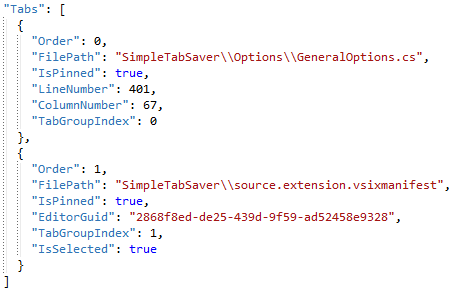
- Storage format: one JSON file per tab layout, holding solution-relative paths, readable and editable in any text editor. The tab layouts are portable, so the solution can be moved, copied to another machine, or committed with its tab layouts for the whole team, and everything keeps working.
- Comprehensive customization: behavior, presentation, confirmations, automation, optional features - everything can be either turned on/off or adjusted in multiple ways. The important part: customization is optional, and the extension is ready to use out of the box.
The design decisions and what went wrong along the way are covered in the Dev Journal, starting with replacing a broken extension.